What is the best wireless karaoke microphone?
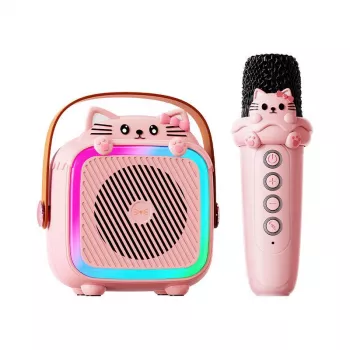
The best wireless karaoke microphone is the one that matches how and where it will be used: at-home TV nights, backyard parties, or travel. For most shoppers, a great pick is a Bluetooth wireless karaoke mic with an onboard speaker, built-in echo/reverb, and simple, dedicated controls for mic volume and music volume. That combo delivers the fastest setup and the most consistently “fun” sound without extra gear.
When comparing options, prioritize a stable connection (Bluetooth that stays paired across a room), a comfortable handle weight, and a battery that can last at least a full hangout (roughly 4–8 hours depending on volume). If singing with friends is the goal, look for easy mixing so vocals don’t get buried under the track—separate volume knobs matter more than flashy lighting.
Features that usually separate the best from the rest
- Sound and vocal effects: Adjustable echo/reverb and minimal hiss at higher volume.
- Connectivity: Bluetooth for quick pairing plus a wired option (AUX or USB) as a backup.
- Controls: Independent mic/music volume, and ideally bass/treble or EQ presets.
- Battery and charging: USB-C charging and a clear battery indicator reduce surprises mid-song.
- Compatibility: Works cleanly with phones/tablets and common karaoke apps; some models also feed a TV/speaker.
Which style should you choose?
If portability is the priority, a mic-with-speaker unit is the easiest “grab-and-sing” option. For bigger rooms or louder parties, a wireless mic that pairs to a dedicated karaoke speaker or machine typically sounds fuller and gets louder with less distortion.
For a deeper breakdown of wireless mic types, Bluetooth setup tips, and what to look for in a complete karaoke system, see the full guide here: wireless karaoke machine and Bluetooth mic guide.
FAQ
How do I connect a wireless karaoke microphone to my TV?
Many mics connect to a TV through an AUX input, Bluetooth (if supported), or by routing audio through a karaoke speaker/soundbar connected to the TV. Check whether the mic outputs audio or only pairs for music playback.
Recommended for you










Leave a comment