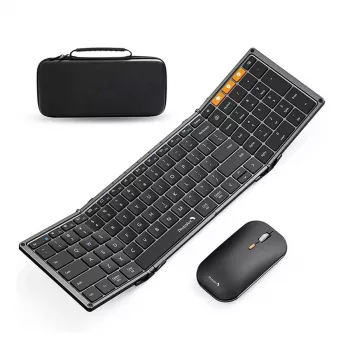
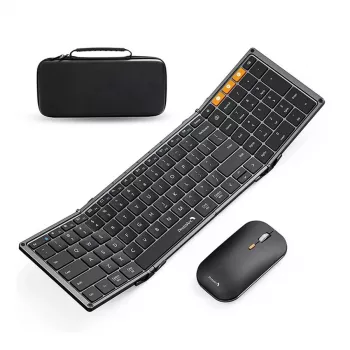
A compact travel setup should feel like a real workstation: comfortable typing, reliable pointing control, and fast switching between devices. A tri-fold Bluetooth keyboard and mouse combo is built for commuting, coffee-shop work sessions, and tight desk setups where space matters—without giving up the familiarity of a full-size layout.
What makes a tri-fold combo different
The tri-fold format is all about packing small and working big. Folded, it takes up far less space than a rigid keyboard; unfolded, it aims to feel like a “normal” layout instead of a cramped, ultra-mini board.
- Tri-fold design reduces footprint in a bag while opening into a work-ready keyboard shape.
- Keyboard + mouse pairing as a set simplifies portable setup compared with mixing devices from different brands.
- Slim form factor helps keep weight and bulk down for frequent travel.
- Full-size feel prioritizes familiar spacing and usability rather than tiny keys that slow you down.
If you’re often switching between a laptop, tablet, and phone, Bluetooth accessories can also reduce cable clutter. For a quick refresher on how Bluetooth works and why range/interference can matter, see the official Bluetooth Technology Basics.
Design and portability details to notice
Not all folding keyboards travel the same. Small design choices can make the difference between “easy to toss in a bag” and “annoying to use on the go.”
- Fold hinges: stable hinges help prevent flex during typing, especially on uneven surfaces like café tables.
- Closed profile: when folded, the unit should help protect the keys from pressure inside a backpack or sleeve.
- Grip and feet: anti-slip feet keep the keyboard steady on slick desks or airplane tray tables.
- Mouse travel readiness: a compact mouse should still offer steady cursor control instead of feeling twitchy.
Portability checklist
| Item |
Why it matters |
Quick check before buying |
| Folded size |
Fits small bags and tech pouches |
Compare folded dimensions to your pouch/sleeve |
| Weight |
Comfortable for daily carry |
Consider combined keyboard + mouse weight |
| Hinge stability |
Prevents wobble while typing |
Look for consistent, firm folding joints |
| Non-slip support |
Keeps the keyboard steady |
Check for rubber feet or a textured base |
| Mouse shape |
Comfort during long sessions |
Confirm it’s not overly flat for your grip style |
Full-size typing experience on the go
A travel keyboard earns its keep when it lets you type at close to your normal speed. Beyond “does it connect,” focus on how the layout and key feel match your daily habits.
- Layout expectations: verify spacing and placement for keys you hit constantly (Enter, Backspace, Shift).
- Key feel: low-profile keys can be quick and quiet, but should still give clear feedback so you don’t over-press.
- Stability: once unfolded, the keyboard should feel rigid enough to avoid missed keystrokes.
- Shortcuts: function keys are most useful when they align with your platform (iPadOS, Windows, Android, macOS).
For tablet-first work—notes, email, light editing—a stable, familiar layout can be the difference between “quick reply” and “real work session.”
Mouse performance for travel work
Trackpad alternatives often feel limiting for spreadsheets, selection-heavy tasks, or precise cursor movement. A compact Bluetooth mouse can restore a desktop-like flow in places where you’d rather not balance a laptop on your knees.
- Tracking consistency: smooth movement helps with spreadsheets, editing, and accurate selections.
- Click feel: crisp clicks can reduce fatigue during long sessions compared to mushy switches.
- Surface tolerance: travel involves mixed surfaces; better tracking across more surfaces helps.
- Portability trade-off: smaller mice pack easily, but may feel cramped for larger hands over all-day use.
Bluetooth connectivity and device switching
Wireless convenience only feels convenient when it’s reliable. Strong Bluetooth behavior means fewer dropped connections, less lag, and smoother transitions between devices.
- Multi-device workflow: quick switching is valuable when moving from phone to tablet to laptop.
- Pairing simplicity: initial pairing should be straightforward—and reconnect smoothly after sleep.
- Connection reliability: stable Bluetooth reduces delayed input and repeated keystrokes.
- Range and interference: crowded wireless environments can affect performance; keeping the host device nearby helps.
If you’re pairing with Apple mobile devices, Apple’s guidance for Bluetooth accessories is a useful reference: Use a Bluetooth accessory with your iPhone, iPad, or iPod touch. For Windows troubleshooting steps, Microsoft’s official guide can help: Fix Bluetooth problems in Windows.
Battery, charging, and everyday readiness
Portable gear should be ready when you open your bag—without the “dead battery surprise.” Pay attention to charging basics and small usability cues that reduce friction.
Compatibility with tablets, phones, and computers
Setup tips for a smoother first day
Who this combo is best for
Care, storage, and travel protection
Shop in-stock picks
FAQ
How does a tri-fold Bluetooth keyboard and mouse combo pair with a tablet or phone?
Charge both devices first, then enable Bluetooth on your tablet or phone. Put the keyboard and mouse into pairing mode, select each one in Bluetooth settings, and confirm any pairing code if prompted.
Can the keyboard and mouse be used with more than one device?
Many Bluetooth combos support saving multiple pairings and switching with a dedicated button or key combo. Check the product page or manual for the exact number of devices supported and the switching steps.
What should be checked if the connection drops or typing lags?
Start by checking battery level, then remove old pairings and re-pair the devices. Reduce nearby wireless interference, keep the host device within a few feet, and ensure your phone/tablet/computer OS is up to date.
Recommended for you










Leave a comment