A vertical mouse is designed to reduce wrist twist while still keeping fast, consistent control for everyday work and casual gaming. With a handshake-style grip and a wireless connection, an ergonomic 1600DPI wireless vertical mouse can feel like a small hardware change that makes long sessions noticeably easier—especially when paired with a relaxed grip and a well-set workstation.
What Makes a Vertical Mouse Feel Different
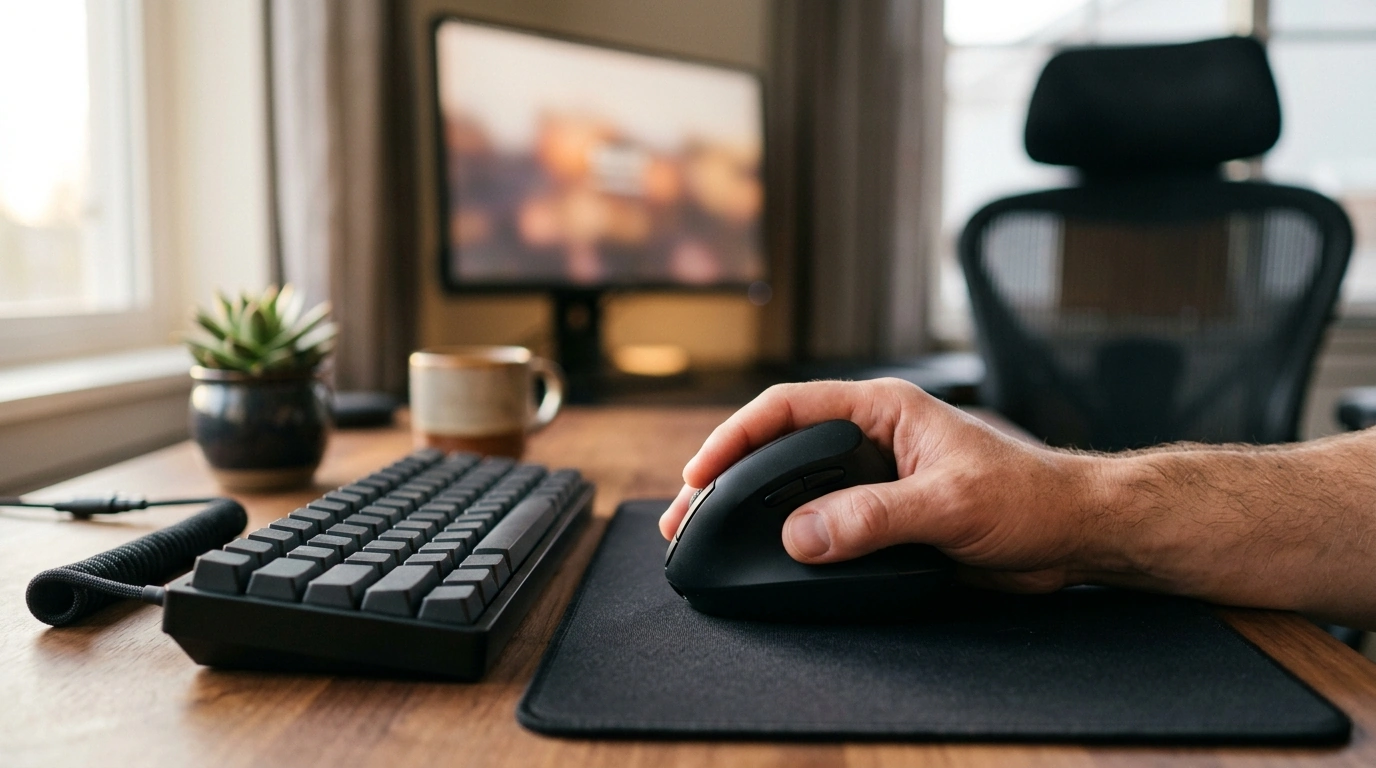
Traditional flat mice often encourage the forearm to rotate inward (pronation). A vertical mouse changes that angle so your hand rests more like a handshake.
- Handshake-style grip: Helps reduce forearm rotation compared with a standard mouse.
- More neutral wrist posture: Encourages a straighter wrist angle during long workdays or late-night matches.
- Best results with good ergonomics: Desk height, chair height, and how far you reach matter as much as the mouse shape.
- Expect an adjustment period: Start with short sessions, then build up as your hand learns the new angles.
If you want a broader ergonomic checklist for your workspace, OSHA’s guidance on computer workstations is a helpful reference: OSHA Computer Workstations eTool.
Key Features to Look For in Comfort + Gaming Use
Vertical mice vary a lot in sensor feel, button placement, and overall stability. For a mouse that can handle office tasks and gaming without feeling “mushy” or inconsistent, prioritize these practical traits.
- DPI control: Higher sensitivity can reduce large arm movements, while lower DPI can improve precision depending on your play style and game genre.
- Button layout: Primary clicks should feel crisp and consistent; side buttons are especially useful for browser navigation or in-game binds.
- Wireless stability: A steady connection is often more important than a headline DPI number for smooth tracking and reliable inputs.
- Shape and size: Palm support and a thumb rest can reduce pinch-grip fatigue, which tends to build during long sessions.
- Surface compatibility: Consistent tracking across mousepads and desk surfaces helps aiming feel predictable.
Quick Specs Snapshot
A 1600DPI wireless vertical mouse is typically aimed at everyday comfort with enough speed for most non-competitive gaming. It’s a practical way to try a more neutral grip without committing to a high-priced specialty mouse.
Feature overview and why it matters
| Feature |
What to expect |
Why it matters |
| Vertical ergonomic shape |
Handshake-style grip and a taller profile |
Can reduce wrist strain during long computer sessions |
| 1600DPI sensitivity |
Fast cursor movement with controllable speed |
Useful for general gaming, browsing, and productivity |
| Wireless connection |
Freedom of movement without a cable |
Cleaner desk setup and less drag during quick flicks |
| Everyday button set |
Primary clicks plus support buttons depending on model layout |
Convenient navigation and shortcuts for work or games |
Comfort Setup Tips (Small Changes, Big Difference)
Ergonomics is cumulative: a better mouse helps, but the bigger win often comes from minor positioning changes that reduce tension across your shoulder, elbow, and wrist.
- Bring the mouse closer: Keep shoulders relaxed and avoid reaching forward; place the mouse near the keyboard to reduce shoulder strain.
- Dial in cursor speed: Adjust OS pointer speed so the cursor crosses the screen without repeated wrist flicks.
- Use a consistent mousepad: A reliable surface can improve tracking and reduce “surprise” skips.
- Take quick resets: Brief breaks—open/close hands, roll shoulders, and reset posture—can keep fatigue from building.
- Check the whole workstation: If discomfort persists, revisit chair height, elbow angle, and monitor position. Mayo Clinic’s office ergonomics overview is a useful benchmark: Mayo Clinic: Office ergonomics.
Gaming Feel: Tracking, Control, and Play Styles
The big question is whether the vertical grip stays stable when the pace ramps up. For many players, it works well once the hand adapts—especially if comfort is the priority and you’re not chasing ultra-low-latency competitive tuning.
- Where 1600DPI fits: Good for casual shooters, RPGs, strategy, and general play where you want speed without excessive motion.
- Competitive FPS reality check: If your style depends on rapid aim changes and very fine micro-corrections, test whether the vertical grip feels locked-in during fast flicks.
- Use button binds smartly: Map common actions (push-to-talk, melee, reload, abilities) to easy-to-reach buttons to reduce keyboard stretching.
- Think “arm-guided” movement: Aim for smoother forearm motion rather than tight, wrist-only micro-motions—especially when learning the shape.
Who This Mouse Fits Best
- People who feel wrist or forearm fatigue with standard mice and want a more neutral grip.
- Students and office users who also game after work and want one comfortable mouse for both.
- Laptop users building a compact wireless setup.
- Buyers who want ergonomic benefits at a low entry price.
Care, Maintenance, and Everyday Reliability
Wireless mice are low-maintenance, but a few habits help keep tracking consistent and clicking feel dependable.
Product Options
FAQ
Is a vertical mouse good for gaming?
It can be great for many genres, especially for longer sessions where comfort matters. There’s usually an adjustment period, and players focused on precision-heavy competitive FPS may still prefer a traditional shape depending on their aiming style.
What does 1600DPI mean in everyday use?
DPI is a sensitivity measure: higher DPI moves the cursor farther with less physical movement. You can fine-tune feel by adjusting your operating system pointer speed and in-game sensitivity so movement stays quick without becoming jittery.
How long does it take to get used to a vertical mouse?
Many people adapt within a few hours, while others may take a week or two to feel fully natural. Starting with short sessions, keeping a relaxed grip, and adjusting sensitivity typically speeds up the transition.
Recommended for you








Leave a comment