Magnetic Wireless Charger Stands: A Cleaner, Easier Way to Power Up Your iPhone
A magnetic wireless charging stand takes the daily “plug in, unplug, repeat” routine and turns it into a simple snap-on dock. With the phone held upright at a comfortable viewing angle, it’s easier to check notifications, take calls, use Face ID, and keep an eye on timers or StandBy mode—while the charging coil stays consistently aligned for steadier power delivery. If you’re setting up a nightstand charger or a desk dock, a 15W magnetic stand can be a practical upgrade that looks tidy and works reliably when paired with the right power adapter and case.
What a magnetic wireless charger stand does
Unlike flat wireless pads that can shift if the phone vibrates or gets bumped, a magnetic stand is designed to “seat” the phone in the best charging position and hold it there.
- Stable coil alignment: The magnetic attachment helps keep the iPhone centered on the charging coil while staying upright.
- Hands-free viewing while charging: Great for quick glances at notifications, video calls, and keeping the screen readable during work.
- Less cable clutter: One dock replaces frequent cable plugging, reducing wear on the Lightning/USB-C port and keeping surfaces cleaner.
- More consistent than many flat pads: A fixed position helps avoid “charging/not charging” moments caused by slight misplacement.
For a deeper look at wireless standards, the Wireless Power Consortium’s Qi overview explains how Qi-certified charging is designed to operate safely across compatible devices.
Fast charging expectations (15W) in everyday use
A dock labeled “15W” describes its maximum supported output under ideal conditions. Real-world speeds can vary depending on iPhone model support, charger certification, the wall adapter’s wattage, and temperature management.
- Model and ecosystem matter: iPhone charging behavior can differ by generation, especially with MagSafe-style alignment and iOS power management.
- Power adapter quality affects results: A 15W-rated dock typically performs best with a capable power adapter and a solid cable; underpowered adapters can bottleneck charging.
- Heat can reduce speed: Warm rooms, direct sunlight, thick cases, or heavy usage (gaming, navigation) may trigger protective throttling.
- Best practice for faster top-ups: Keep the phone cool, reduce heavy background activity, and make sure the phone “clicks” into the centered magnetic position.
When charging overnight, iPhone battery management features can help reduce long-term wear. Apple’s guide on Optimized Battery Charging explains how iOS learns routines to finish charging closer to when you wake up.
Desk and bedside setups that work well with a charging stand
Bedside placement
For a nightstand, position the stand where the screen is visible without reaching—useful for alarms, time checks, and StandBy mode. Keep the dock on a hard, flat surface (not on fabric) so heat can dissipate more effectively.
Work desk layout
At a desk, an upright dock keeps your phone readable during meetings and reduces the temptation to leave a cable stretched across your workspace. It also makes it easy to grab the phone and snap it back one-handed without hunting for a connector.
Shared spaces and quick docking
In kitchens, entry tables, or shared living areas, magnetic docking helps reduce “where’s the charger?” confusion—there’s one obvious place to put the phone, and it reattaches quickly without fiddling.
Travel-friendly power routine
If you travel with a stand, pair it with a compact PD wall adapter to keep input power consistent. Even when wireless output varies, stable input helps the charger maintain better performance.
Compatibility and fit: iPhone models, cases, and magnetic alignment
Quick compatibility checklist
| Item |
What to look for |
Why it matters |
| iPhone support |
MagSafe-style magnetic alignment (or Qi wireless charging at minimum) |
Ensures stable placement and reliable coil alignment |
| Case type |
MagSafe-compatible, not overly thick |
Maintains magnetic hold and reduces power loss |
| Power adapter |
Adequate wattage (PD recommended when supported) |
Avoids slow charging due to insufficient input power |
| Environment |
Cool, ventilated surface |
Limits thermal throttling for steadier charging |
For a quick overview of MagSafe accessories and how the magnetic alignment ecosystem works, Apple’s MagSafe accessories page is a helpful reference.
Safety and battery care
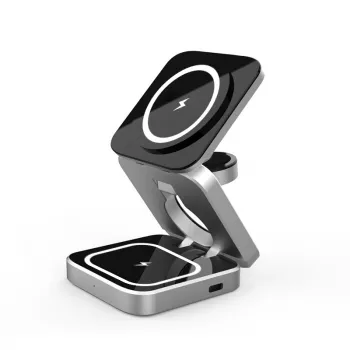
If the goal is a clean, dependable dock that makes charging feel effortless, the Magnetic Wireless Charger Stand 15W Fast Charging Dock for iPhone is built around that daily convenience: snap-on placement, upright viewing, and a compact footprint that fits naturally on desks and nightstands.
Other in-stock finds for a cleaner setup
Common setup issues and quick fixes
FAQ
Will a magnetic wireless charger stand work with an iPhone case on?
Yes—MagSafe-compatible cases generally work well and maintain strong alignment. Very thick cases or cases with metal parts can weaken the magnetic hold and reduce charging efficiency, so test without the case if charging becomes inconsistent.
Why is my iPhone charging slowly on a 15W wireless dock?
Slow charging is commonly caused by an underpowered wall adapter, a poor-quality cable, excess heat, heavy phone usage while charging, or slight misalignment on the stand. Use a compatible PD-style adapter when supported, keep the phone cool, and re-seat it so it locks into the centered magnetic position.
Is it safe to leave an iPhone on a wireless charging stand overnight?
Overnight charging is generally safe, especially with iPhone battery management features like Optimized Battery Charging. Make sure the dock is ventilated, use reputable adapters and cables, and stop using the setup if you notice excessive heat, damage, or repeated charging interruptions.
Recommended for you











Leave a comment