A dependable school backpack should feel easy to carry, protect a 14-inch laptop, and keep daily essentials organized without looking bulky. A lightweight, streamlined backpack can be a strong match for campus routines, commuting, and after-school activities—especially when the layout is built around a stable laptop compartment, practical pockets, and comfortable straps.
Quick look: what this backpack is designed to do
- Carry a 14-inch laptop in a dedicated, stable compartment while leaving room for notebooks, chargers, and personal items.
- Stay comfortable for teens and women with a lightweight build that helps reduce strain during longer walks between classes.
- Keep small essentials easy to reach (keys, phone, cards) for quick transitions between school, transit, and errands.
- Blend into everyday outfits with a streamlined profile suitable for school, libraries, and casual commuting.
Sizing and laptop fit (14-inch devices)
“14-inch laptop” is a category, not a guarantee. Two devices with the same screen size can have very different chassis dimensions depending on bezel width and overall design. Before ordering, it helps to check the laptop’s length, width, and thickness, then compare that to the backpack’s laptop compartment expectations.
- Measure the laptop’s length, width, and thickness before buying; “14-inch” can vary by bezel size and chassis design.
- Look for a padded laptop sleeve or compartment that holds the device snugly to prevent sliding during walking or biking.
- If using a protective case on the laptop, confirm extra clearance so the zipper doesn’t press on corners.
- For tablets or 13-inch laptops, a 14-inch compartment can still work well while leaving room for a slim notebook.
Laptop fit checklist
| Item to check |
Why it matters |
Quick tip |
| Laptop dimensions (L × W × T) |
Avoids tight zippers and corner pressure |
Use the manufacturer spec sheet or measure with a ruler |
| Padded laptop compartment |
Helps reduce bumps and minor impacts |
Prefer padding on the bottom edge too |
| Snug hold (no excessive sliding) |
Improves comfort and protects the device |
Test by gently shaking the bag when loaded |
| Room for charger and accessories |
Prevents bending cables or crowding the laptop |
Use a small pouch to keep cables contained |
Comfort and carry: staying light without feeling flimsy
Lightweight matters most when it’s paired with smart weight distribution. Even a lighter bag can feel uncomfortable if the straps pinch, the load swings, or heavy items sit too far from the back panel. For all-day wear, prioritize adjustability and a stable feel over flashy extras.
- A lightweight backpack helps most when the straps distribute weight evenly across both shoulders.
- Padded, adjustable shoulder straps reduce pressure points during longer days and heavier textbook loads.
- A breathable back panel can make warm-weather walks more comfortable, especially on crowded campus routes.
- Keeping heavier items close to the back (laptop + books) improves balance and reduces shoulder strain.
For practical load guidance and comfort tips, the American Academy of Pediatrics backpack safety guidance and the CDC backpack safety tips are helpful references for students and families.
Organization that matches a school day
The best organization feels “invisible”: everything has a place, and the bag still closes easily without bulging. A solid school-day layout usually includes a protected zone for electronics, a main compartment for papers and food, and small pockets for quick-grab items.
- A main compartment should fit notebooks, folders, and a lunch container without crushing small items.
- Front or interior pockets help separate chargers, earbuds, pens, and ID cards for faster access.
- Side pockets are useful for water bottles or a compact umbrella to help prevent spills inside the main compartment.
- A dedicated spot for keys and small valuables reduces “bottom-of-the-bag” searching between classes.
Simple packing layout (example)
| Zone |
What to put there |
Benefit |
| Laptop compartment |
14-inch laptop, slim sleeve |
Stability and protection |
| Main compartment |
1–2 notebooks, folder, small lunch/snack |
Prevents bending papers and keeps bulk centralized |
| Accessory pocket |
Charger, cable, earbuds, pen |
Faster access and fewer tangles |
| Quick-access pocket |
Phone, cards, keys |
Less time rummaging during transitions |
| Side pocket |
Water bottle/umbrella |
Keeps wet items away from books and electronics |
Protection and durability for everyday use
School bags get dragged under desks, bumped on bus floors, and squeezed into lockers. Durability details—like fabric resilience and zipper quality—tend to matter more than decorative features when the goal is reliable daily carry.
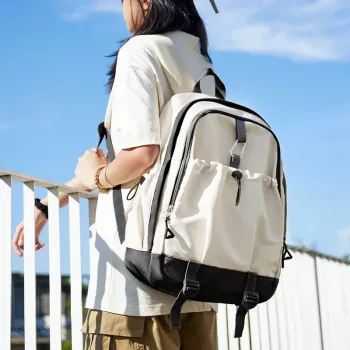
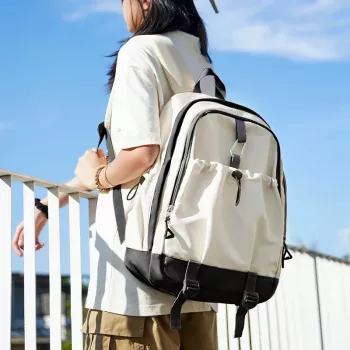
Styling and use cases: school, commute, and weekends
Product option in stock
At-a-glance details
More in-stock picks for dorm and daily routines
FAQ
Will a 14-inch laptop backpack fit a 15-inch laptop?
Sometimes, but it depends on the laptop’s real dimensions and thickness. Compare the laptop’s length and width to the backpack’s laptop compartment space—if it’s tight, it can strain zippers and press on corners.
How should a backpack fit for comfort during a full school day?
Wear both straps and tighten them so the bag sits close to your back without sagging below the waist. Pack heavier items (laptop and books) closest to the back panel to improve balance and reduce shoulder strain.
What’s a reasonable backpack weight for students?
A manageable load is one that doesn’t change posture or cause persistent shoulder, neck, or back discomfort. Rotating materials day-to-day and using digital copies when possible can help prevent overloading.
Recommended for you









Leave a comment